In a strong cybersecurity assessment report, you rate each finding by its risk to the organization rather than its raw tool score. You give readers the context and remediation steps they need to act on it. This cheat sheet covers how to analyze the data, document scope and methodology, write up findings and fixes, and serve both the executives and engineers who read the report.
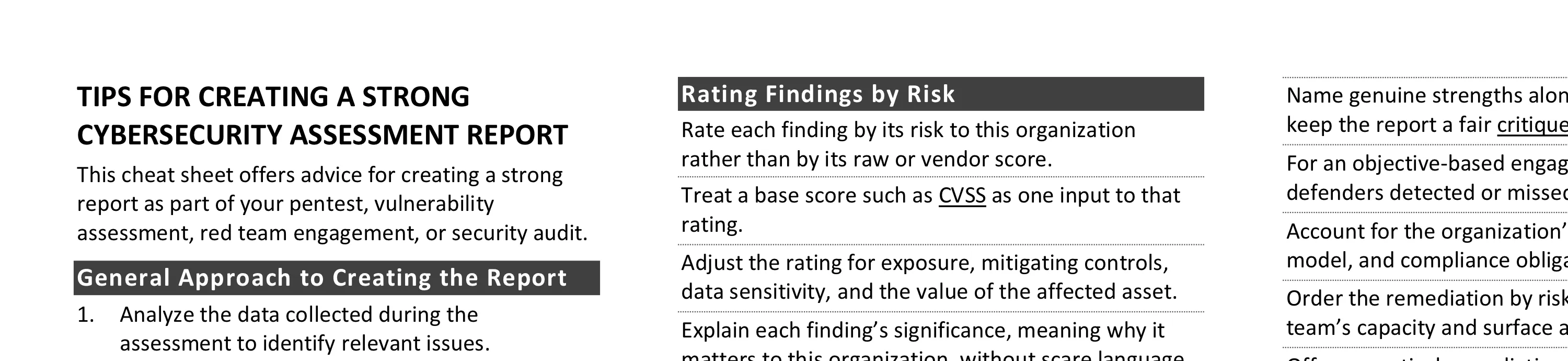
This cheat sheet offers advice for creating a strong report as part of your pentest, vulnerability assessment, red team engagement, or security audit. To print, use the one-sheet PDF version; you can also edit the Word version for your own needs.
General Approach to Creating the Report
- Analyze the data collected during the assessment to identify relevant issues.
- Prioritize findings by their risk to the organization, then formulate remediation steps.
- Document the assessment’s methodology and scope.
- Describe your prioritized findings and recommendations.
- Attach the figures and data that support the body of your report.
- Write the executive summary to highlight the key findings and recommendations.
- Proofread and edit the document.
- Submit a draft to weed out false positives and confirm expectations.
- Send the final report to the recipient using an agreed-upon secure method.
- Discuss the report’s contents with the recipient by phone, video call, or in person.
Analysis of the Security Assessment Data
- Share your analysis and insights, not the raw output of your scanners or AI agents.
- Look for patterns and trends by grouping findings by affected asset, risk, or category.
- Trace related findings to a shared root cause, so a single fix can resolve several.
- Consider what information you received is incomplete or might be a lie or half-truth.
- Fill the gaps in your understanding with follow-up scans, documentation requests, and interviews.
Rating Findings by Risk
- Rate each finding by its risk to this organization rather than by its raw or vendor score.
- Treat a base score such as CVSS as one input to that rating.
- Adjust the rating for exposure, mitigating controls, data sensitivity, and the value of the affected asset.
- Explain each finding’s significance, meaning why it matters to this organization, without scare language.
- Define your severity levels and the action each one implies, such as Critical, High, Medium, and Low.
Scope and Methodology of the Assessment
- Specify the systems, applications, and processes in scope, and note what you excluded and why.
- Scope by what an attacker can reach, and name adjacent systems the work might touch.
- State the assessment’s objectives, its timing, and the constraints on time, access, or scenario.
- Clarify the type of assessment you performed, such as a pentest, vulnerability assessment, or red team.
- Name the standards and frameworks that informed the work, such as NIST SP 800-115, the OWASP testing guides, or MITRE ATT&CK.
- Describe the tools and manual techniques you used, including any AI-driven testing.
- Explain how you set severity and ordered the findings, so the reader can follow and trust the results.
Documenting Findings and Remediation
- Give each finding a clear title, the affected asset(s) and a count if many, its significance, and how to fix it.
- Identify each affected asset precisely, such as a file path and commit, a URL and parameter, or a cloud account, region, and resource.
- Give reproducible steps to verify the weakness and the fix, and mark each finding confirmed or potential.
- Name genuine strengths alongside the weaknesses to keep the report a fair critique.
- For an objective-based engagement, report what defenders detected or missed and the dwell time.
- Account for the organization’s industry, business model, and compliance obligations.
- Order the remediation by risk, then adjust for the team’s capacity and surface a few quick wins.
- Offer a practical remediation path instead of only pointing out problems.
Qualities of a Good Assessment Report
- Open with an executive summary a non-technical reader can understand on its own.
- Structure the report to serve both the leaders who decide and the engineers who fix the findings.
- Write concrete statements in the active voice, and keep the report as brief as it can be.
- Use a professional, easy-to-follow layout, and put non-critical detail in an appendix.
- Mark the report’s sensitivity, store and send it securely, and for external reports note its point-in-time scope.
Sharpen the Findings
- Chain related low-severity findings into one when together they enable a serious attack.
- Add a short exploit scenario when the path from a weakness to real impact isn’t obvious.
- Split a fix into a quick stopgap and a root-cause remediation when both apply.
- Track each finding’s status across drafts and retests, such as open, remediated, or risk accepted.
More Assessment Resources
- A report template for security assessments, with a one-page brief and an MCP server for your AI agent.
- Qualities of a good assessment report
Post-Scriptum
Authored by Lenny Zeltser, a cybersecurity leader who’s served as a CISO and product executive. Lenny has read and written many reports over the years, and created a writing course at SANS Institute.
Thanks for feedback to Dave Shackleford and John Strand. This cheat sheet, version 2.0, is distributed under CC BY 4.0. Take a look at my other security cheat sheets.