Windows' netsh tool can save and restore network configurations, useful for malware analysis labs that frequently switch between isolated segments and Internet-connected networks. Save configurations with "netsh interface dump" and restore with "netsh -f", creating shortcuts for quick profile switching.
When performing behavioral analysis of malware, it’s not uncommon to switch between networks. You might need to be connected to the Internet for some tasks, such as investigating a suspicious website. For others, such as interacting with a malicious program, you may need to be on a fully isolated segment. The “netsh” tool, built into Windows, can help you quickly switch the laboratory system’s network configuration profiles.
Saving and Restoring Network Configuration with Netsh
Use the “netsh interface dump” command on Windows to view your current network configuration details in a Netsh-compatible script format. You’ll want to save the output of the tool to a text configuration file, such as:
netsh interface dump > netsh-config1.txtThe saved configuration might look something like this (click the image for the full sample file): 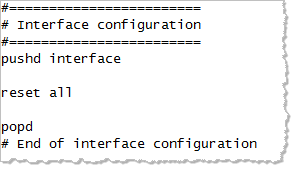
To apply the saved configuration script, use the “netsh -f” command like this:
netsh -f netsh-config1.txtNetsh for the Malware Lab
Now that you know how to save and restore the Windows system’s network configuration, you can use Netsh to easily switch between network configuration profiles. For instance, one of your profiles might hard-code IP address, default gateway and DNS server details. Save that profile as netsh-config-static1.txt. In another profile you might want to use DHCP; configure your system in the desired way and save that configuration as “netsh-config-dhcp1.txt”. Then create shortcuts to easily switch between profiles. One shortcut would run “netsh -f netsh-config-static1.txt”; the other “netsh -f netsh-config-dhcp1.txt”. Hand-picked related items:
- 3 Free NirSoft Tools for Malware Analysis
- Process Monitor Filters for Malware Analysis and Forensics
- Process Hacker as an Alternative to Process Explorer
Just so you know, I teach the malware analysis course at SANS Institute.