Process Hacker is an open source replacement for Task Manager and Process Explorer. It displays processes in a tree, color-codes debugged, service, and packed processes, shows network connections with owning processes, and offers powerful memory viewing, string extraction, and DLL injection capabilities.
Process Hacker is an open source replacement not only for the built-in Windows Task Manager, but also for the popular Process Explorer tool. Process Hacker implements many of the same features that Process Explorer has for examining local processes, and adds a number of unique capabilities that are especially useful when examining an infected system or analyzing malware.
Like Process Explorer, Process Hacker can display the listing of running processes in a tree-like fashion, showing you the parent-child relationship between the processes. Both tools color-code the entries based on the processes’ characteristics:
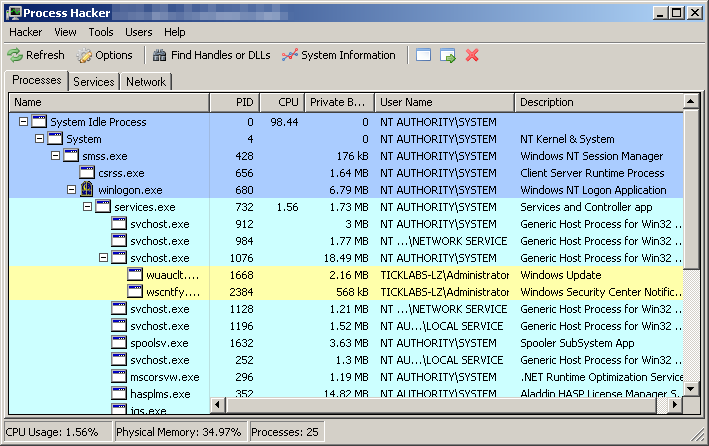
Process Hacker can visually identify processes that are being debugged, those are associated with services and those that were packed. You can see the legend and change color assignments by selecting Hacker > Options > Highlighting:

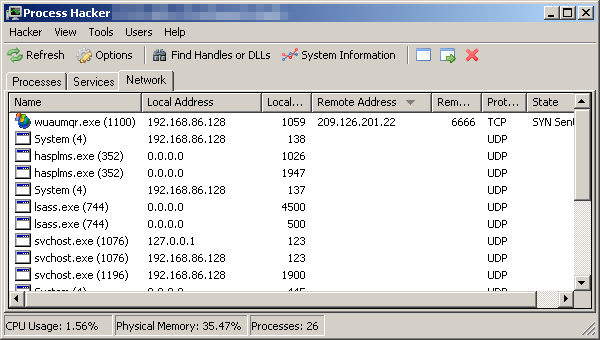
Process Hacker includes a separate tab for listing active services, and a tab showing active network connections. The tab shows local and remote IP and port details and identifies the local process that owns the connection:
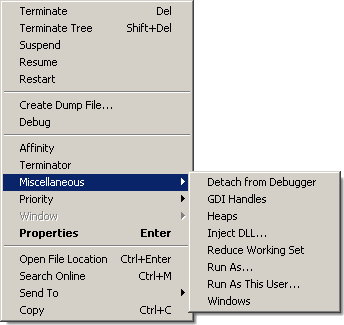
Process Hacker shines in the number of capabilities it offers for analyzing and manipulating a particular process. For instance, right-clicking the process presents you with various menu options:
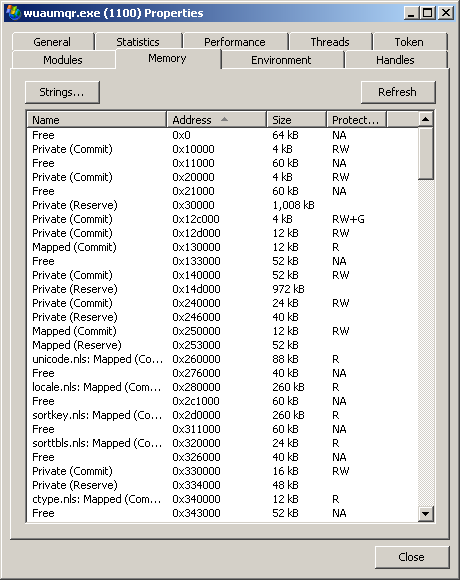
Selecting Properties gives you several tabs. One of the most useful ones is Memory, which lets you the ability to view contents of the process’ memory, extract strings, search based on regular expressions and even modify memory contents.
Other capabilities of Process Hacker include the ability to locate some hidden processes, inject a DLL into a process, create a service, locate file handles and DLLs, and many others. The best way to become familiar with the tool is to experiment with it. Give it a try, then be sure to share with others what you have learned.