Analyzing malicious documents involves examining files for anomalies, locating embedded code like macros or JavaScript, extracting and deobfuscating suspicious content, and emulating shellcode. Key tools include olevba for Office macros, pdfid for risky PDF keywords, and xlmdeobfuscator for Excel 4.0 macros.
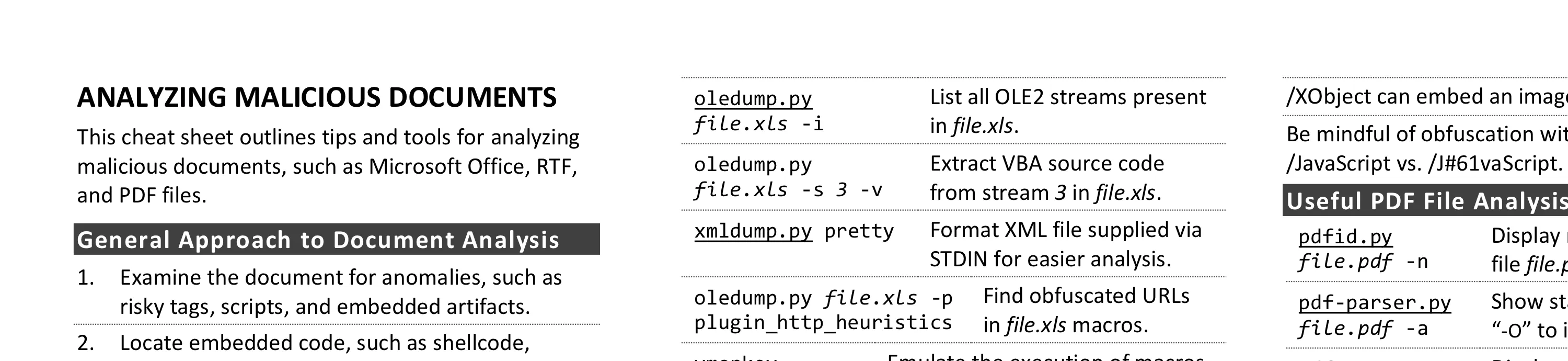
This cheat sheet outlines tips and tools for analyzing malicious documents, such as Microsoft Office, RTF, and PDF files. To print it, use the one-page PDF version; you can also edit the Word version to customize it for you own needs.
General Approach to Document Analysis
- Examine the document for anomalies, such as risky tags, scripts, and embedded artifacts.
- Locate embedded code, such as shellcode, macros, JavaScript, or other suspicious objects.
- Extract suspicious code or objects from the file.
- If relevant, deobfuscate and examine macros, JavaScript, or other embedded code.
- If relevant, emulate, disassemble and/or debug shellcode that you extracted from the document.
- Understand the next steps in the infection chain.
Microsoft Office Format Notes
- Binary Microsoft Office document files (.doc, .xls, etc.) use the OLE2 (a.k.a. Structured Storage) format.
- SRP streams in OLE2 documents sometimes store a cached version of earlier VBA macro code.
- OOXML document files (.docx, .xlsm, etc.) supported by Microsoft Office are compressed zip archives.
- VBA macros in OOXML documents are stored inside an OLE2 binary file, which is within the zip archive.
- Excel supports XLM macros that are embedded as formulas in sheets without the OLE2 binary file.
- RTF documents don’t support macros but can contain malicious embedded files and objects.
Useful Microsoft Office File Analysis Commands
| Command | Description |
|---|---|
| zipdump.py file.pptx | Examine contents of OOXML file file.pptx. |
| zipdump.py file.pptx -s 3 -d | Extract file with index 3 from file.pptx to STDOUT. |
| olevba file.xlsm | Locate and extract macros from file.xlsm. |
| oledump.py file.xls -i | List all OLE2 streams present in file.xls. |
| oledump.py file.xls -s 3 -v | Extract VBA source code from stream 3 in file.xls. |
| xmldump.py pretty | Format XML file supplied via STDIN for easier analysis. |
| oledump.py file.xls -p plugin_http_heuristics | Find obfuscated URLs in file.xls macros. |
| vmonkey file.doc | Emulate the execution of macros in file.doc to analyze them. |
| evilclippy -uu file.ppt | Remove the password prompt from macros in file.ppt. |
| msoffcrypto-tool infile.docm outfile.docm -p | Decrypt outfile.docm using specified password to create outfile.docm. |
| pcodedmp file.doc | Disassemble VBA-stomped p-code macro from file.doc. |
| pcode2code file.doc | Decompile VBA-stomped p-code macro from file.doc. |
| rtfobj.py file.rtf | Extract objects embedded into RTF file.rtf. |
| rtfdump.py file.rtf | List groups and structure of RTF file file.rtf. |
| rtfdump.py file.rtf -O | Examine objects in RTF file file.rtf. |
| rtfdump.py file.rtf -s 5 -H -d | Extract hex contents from group in RTF file file.rtf. |
| xlmdeobfuscator —file file.xlsm | Deobfuscate XLM (Excel 4) macros in file.xlsm. |
Risky PDF Keywords
- /OpenAction and /AA specify the script or action to run automatically.
- /JavaScript, /JS, /AcroForm, and /XFA can specify JavaScript to run.
- /URI accesses a resource by its URL, perhaps for phishing.
- /SubmitForm and /GoToR can send data to URL.
- /RichMedia can be used to embed Flash in a PDF.
- /ObjStm can hide objects inside an object stream.
- /XObject can embed an image for phishing.
- Be mindful of obfuscation with hex codes, such as /JavaScript vs. /J#61vaScript. (See examples.)
Useful PDF File Analysis Commands
| Command | Description |
|---|---|
| pdfid.py file.pdf -n | Display risky keywords present in file file.pdf. |
| pdf-parser.py file.pdf -a | Show stats about keywords. Add “-O” to include object streams. |
| pdf-parser.py file.pdf -o id | Display contents of object id. Add “-d” to dump object’s stream. |
| pdf-parser.py file.pdf -r id | Display objects that reference object id. |
| qpdf —password=pass —decrypt infile.pdf outfile.pdf | Decrypt infile.pdf using password pass to create outfile.pdf. |
Shellcode and Other Analysis Commands
| Command | Description |
|---|---|
| xorsearch -W -d 3 file.bin | Locate shellcode patterns inside the binary file file.bin. |
| scdbgc /f file.bin | Emulate execution of shellcode in file.bin. Use “/off” to specify offset. |
| runsc32 -f file.bin -n | Execute shellcode in file.bin to observe behavior in an isolated lab. |
| base64dump.py file.txt | List Base64-encoded strings present in file file.txt. |
| numbers-to-string.py file | Convert numbers that represent characters in file to a string. |
Additional Document Analysis Tools
- SpiderMonkey, cscript, and box-js help deobfuscate JavaScript that you extract from document files.
- Use the debugger built into Microsoft Office to deobfuscate macros in an isolated lab.
- Use AMSIScriptContentRetrieval.ps1 to observe Microsoft Office execute macros in an isolated lab.
- Some automated analysis sandboxes can analyze aspects of malicious document files.
- REMnux distro includes many of the free document analysis tools mentioned above.
Post-Scriptum
Special thanks for feedback to Pedro Bueno and Didier Stevens. Creative Commons v3 “Attribution” License for this cheat sheet version 4.1.