Users avoid updates because they require too many clicks, downloads are heavy, finalizing requires reboots, and mechanisms fail for non-privileged users. Google Chrome and Windows Update show better design. Enterprise IT should assume users won't patch timely and use centralized management tools.

68% of computer users prefer to have dental surgery rather than install security updates on their laptops or desktops. OK, I made that up, but my point is that updating software is time-consuming and annoying, which is probably why many people don’t bother to install security patches. Software vendors need to make the update process as easy as possible; at the same time, corporate IT teams need to plan their security architecture with the assumptions that end-users won’t manually install patches in a timely manner.
Security update mechanisms often have the following weaknesses from the perspective of the user’s experience:
- Many clicks are needed to initiate an update. Users may be asked to click through multiple prompts when going through the setup wizard, even though most users just want the update to be installed with exact same options and features as what they selected when installing the software originally. Most products seem to have this issue.
- Update packages are heavy and take long to download. It’s easier for software vendors to include a full installation package when updating the product, rather than selectively download and update only the necessary components. Users connected from hotel, cafe or other relatively slow networks will delay the download. For instance, installing a VMware Workstation update requires downloading the full installation package that weighs over 500MB.
- Finalizing the update requires a reboot. Sometimes reboots are hard to avoid, because the updates files are in use. However, the vendor could engineer the update mechanism to perform hot-patching of files in memory and use other OS tricks to save the user the pain of having to reboot. For instance, it is unclear why the user needs to reboot after installing Adobe’s PDF viewer.
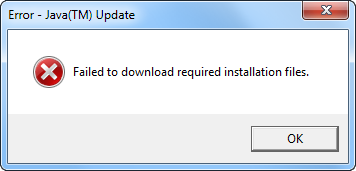
- Some update mechanisms fail for non-privileged users. Information security professional advise avoiding the use of privileged accounts on routine basis. However, when logged in as a non-admin user, the person may be unable to install the update, even if he or she has the right to elevate privileges to the Administrator level. For instance, Java updater presents the non-privileged Windows 7 user with a privilege-elevating prompt, but then exits with the “Failed to download required installation files” error.
For examples of well-designed security update mechanisms, see:
- Google Chrome: just one click; restart the browser
- Windows Update: very few clicks; files trickle in in the background when bandwidth is not used; sometimes reboot is not required
- Antivirus products: Tools like Symantec Live Update used to require many clicks, but now updates trickle in and can be applied without any user involvement
My hope is that software vendors can devote some R&D and user interface design efforts to make it less painful to install security updates. In the mean time, IT departments should recognize that most end-users will not install client-side updates in a timely manner. Enterprise IT should use Enterprise Management Systems (EMS), such as Group Policy and WSUS to push out updates in a centralized manner. Personal users should use tools such as Secunia to validate that the necessary updates are installed.
Related: