Malware analysis combines behavioral examination with static and dynamic code analysis to understand malicious software. Key steps include using automated sandboxes for triage, monitoring system and network interactions, examining code with Ghidra and x64dbg, and unpacking protected specimens.
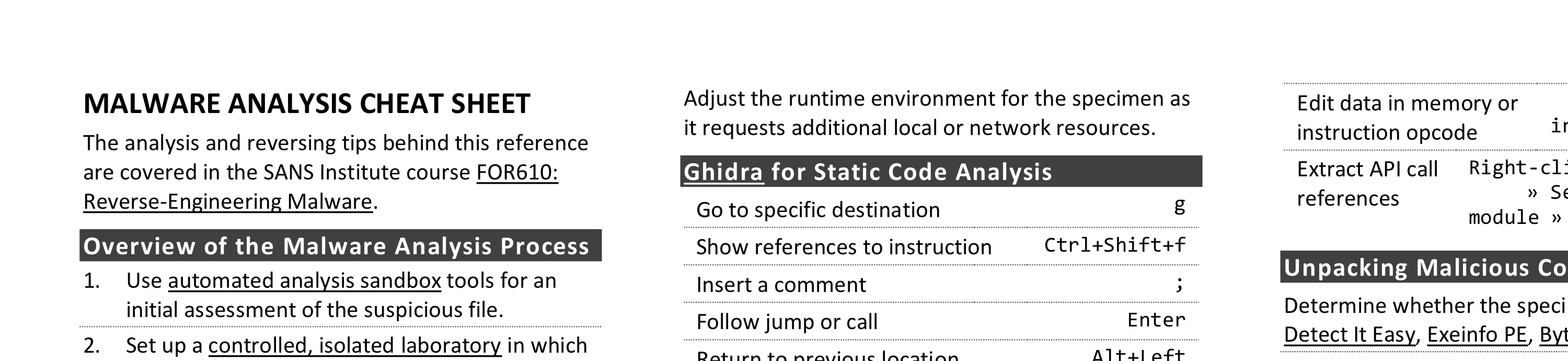
This cheat sheet presents tips for analyzing and reverse-engineering malware. It outlines the steps for performing behavioral and code-level analysis of malicious software. To print it, use the one-page PDF version; you can also edit the Word version to customize it for you own needs.
Overview of the Malware Analysis Process
- Use automated analysis sandbox tools for an initial assessment of the suspicious file.
- Set up a controlled, isolated laboratory in which to examine the malware specimen.
- Examine static properties and meta-data of the specimen for triage and early theories.
- Emulate code execution to identify malicious capabilities and contemplate next steps.
- Perform behavioral analysis to examine the specimen’s interactions with its environment.
- Analyze relevant aspects of the code statically with a disassembler and decompiler.
- Perform dynamic code analysis to understand the more difficult aspects of the code.
- If necessary, unpack the specimen.
- Repeat steps 4-8 above as necessary (the order may vary) until analysis objectives are met.
- Augment your analysis using other methods, such as memory forensics and threat intel.
- Document findings, save analysis artifacts and clean-up the laboratory for future analysis.
Behavioral Analysis
- Be ready to revert to good state via virtualization snapshots, Clonezilla, dd, FOG, PXE booting, etc.
- Monitor local interactions (Process Hacker, Process Monitor, ProcDOT, Noriben).
- Detect major local changes (RegShot, Autoruns).
- Monitor network interactions (Wireshark, Fiddler).
- Redirect network traffic (fakedns, accept-all-ips).
- Activate services (INetSim or actual services) requested by malware and reinfect the system.
- Adjust the runtime environment for the specimen as it requests additional local or network resources.
Ghidra for Static Code Analysis
| Action | Shortcut |
|---|---|
| Go to specific destination | g |
| Show references to selected instruction | Ctrl+Shift+f |
| Insert a comment | ; |
| Follow jump or call | Enter |
| Return to previous location | Alt+Left |
| Go to next view | Alt+Right |
| Undo | Ctrl+z |
| Define data type | t |
| Add a bookmark | Ctrl+d |
| Text search | Ctrl+Shift+e |
| Add or edit a label | l |
| Disassemble selected values | d |
x64dbg/x32dbg for Dynamic Code Analysis
| Action | Shortcut |
|---|---|
| Run the code | F9 |
| Step into/over instruction | F7 / F8 |
| Execute until selected instruction | F4 |
| Execute untill next return | Ctrl+F9 |
| Show previous/next executed instruction | - / + |
| Return to previous view | * |
| Go to specific expression | Ctrl+g |
| Insert comment/label | ; / : |
| Show current function as a graph | g |
| Set software breakpoint on specific instruction | Select instruction » F2 |
| Set software breakpoint on API | Go to Command prompt » SetBPX API Name |
| Highlight all occurrences of the keyword in disassembler | h » Click on keyword |
| Assemble instruction in place of selected one | Select instruction » Spacebar |
| Edit data in memory or instruction opcode | Select data or instruction » Ctrl+e |
| Extract API call references | Right-click in disassembler » Search for » Current module » Intermodular calls |
Unpacking Malicious Code
- Determine whether the specimen is packed by using Detect It Easy, Exeinfo PE, Bytehist, peframe, etc.
- To try unpacking the specimen quickly, infect the lab system and dump from memory using Scylla.
- For more precision, find the Original Entry Point (OEP) in a debugger and dump with OllyDumpEx.
- To find the OEP, anticipate the condition close to the end of the unpacker and set the breakpoint.
- Try setting a memory breakpoint on the stack in the unpacker’s beginning to catch it during cleanup.
- To get closer to the OEP, set breakpoints on APIs such as LoadLibrary, VirtualAlloc, etc.
- To intercept process injection set breakpoints on VirtualAllocEx, WriteProcessMemory, etc.
- If cannot dump cleanly, examine the packed specimen via dynamic code analysis while it runs.
- Rebuild imports and other aspects of the dumped file using Scylla and pe_unmapper.
Bypassing Other Analysis Defenses
- Decode obfuscated strings statically using FLOSS, xorsearch, Balbuzard, etc.
- Decode data in a debugger by setting a breakpoint after the decoding function and examining results.
- Conceal x64dbg/x32dbg via the ScyllaHide plugin.
- To disable anti-analysis functionality, locate and patch the defensive code using a debugger.
- Look out for tricky jumps via TLS, SEH, RET, CALL, etc. when stepping through the code in a debugger.
- If analyzing shellcode, use scdbg and runsc
- Disable ASLR via setdllcharacteristics and CFF Explorer.
Post-Scriptum
Creative Commons v3 “Attribution” License for this cheat sheet version 2.2.