Analyzing malicious documents involves examining files for anomalies, locating embedded code, such as macros or JavaScript, extracting and deobfuscating suspicious content, and emulating shellcode. You'll also find commands for Microsoft Office, RTF, and PDF files, plus tools for JavaScript and shellcode.
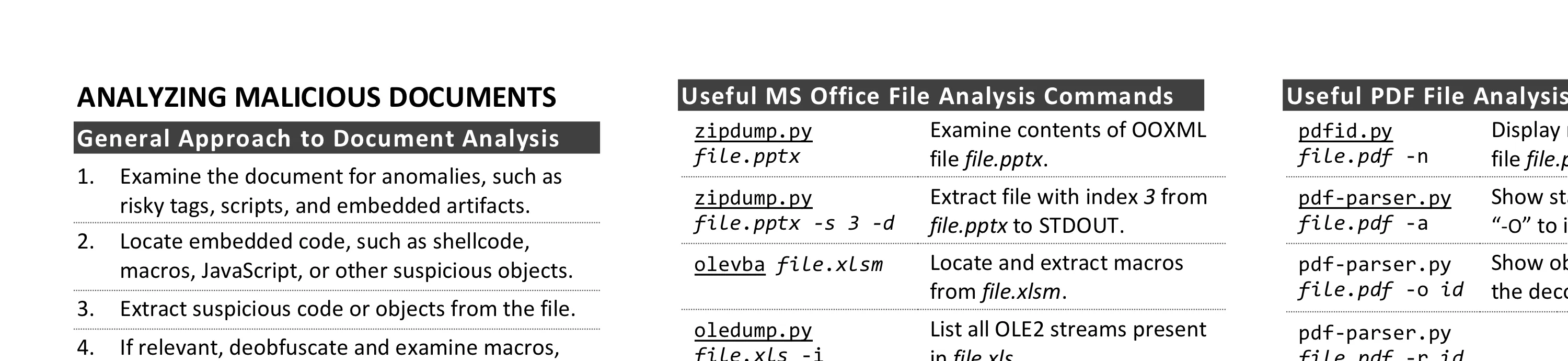
This cheat sheet outlines tips and tools for analyzing malicious documents, such as Microsoft Office, RTF, and PDF files. To print it, use the one-page PDF version. You can also edit the Word version to customize it for your own needs.
General Approach to Document Analysis
- Examine the document for anomalies, such as risky tags, scripts, and embedded artifacts.
- Locate embedded code, such as shellcode, macros, JavaScript, or other suspicious objects.
- Extract suspicious code or objects from the file.
- If relevant, deobfuscate and examine macros, JavaScript, or other embedded code.
- If relevant, emulate, disassemble and/or debug shellcode that you extracted from the document.
- Understand the next steps in the infection chain.
Microsoft Office Format Notes
- Binary Microsoft Office document files (.doc, .xls, etc.) use the OLE2 (a.k.a. Structured Storage) format.
- SRP streams in OLE2 documents sometimes store a cached version of earlier VBA macro code.
- OOXML files (.docx, .xlsm, etc.) are zip archives, but encrypted ones use an OLE2 wrapper.
- VBA macros in OOXML documents are stored inside an OLE2 binary file, which is within the zip archive.
- Excel XLM macros reside in macro sheet cells, separate from VBA projects.
- RTF documents don’t support macros but can contain malicious embedded files and objects.
Useful MS Office File Analysis Commands
| Command | Description |
|---|---|
| zipdump.py file.pptx | Examine contents of OOXML file file.pptx. |
| zipdump.py file.pptx -s 3 -d | Extract file with index 3 from file.pptx to STDOUT. |
| olevba file.xlsm | Locate and extract macros from file.xlsm. |
| oledump.py file.xls -i | List all OLE2 streams present in file.xls. |
| oledump.py file.xls -s 3 -v | Extract VBA source code from stream 3 in file.xls. |
| xmldump.py pretty | Format XML file supplied via STDIN for easier analysis. |
| oledump.py file.xls -p plugin_http_heuristics | Find obfuscated URLs in file.xls macros. |
| oleid file.doc | Identify risky features, such as macros, in file.doc. |
| evilclippy -uu file.doc | Make the locked VBA project in file.doc viewable. |
| msoffcrypto-tool in.docm out.docm -p pass | Decrypt in.docm with password pass to create out.docm. |
| pcodedmp file.doc | Disassemble VBA-stomped p-code macro from file.doc. |
| pcode2code file.doc | Decompile VBA-stomped p-code macro from file.doc. |
| rtfobj -s all file.rtf | Extract objects embedded into RTF file.rtf. |
| rtfdump.py file.rtf | List groups and structure of RTF file file.rtf. |
| rtfdump.py file.rtf -O | Examine objects in RTF file file.rtf. |
| rtfdump.py file.rtf -s 5 -H -d | Extract hex contents from group in RTF file file.rtf. |
| xlmdeobfuscator –file file.xlsm | Deobfuscate XLM (Excel 4) macros in file.xlsm. |
Risky PDF Keywords
- /OpenAction and /AA run actions automatically.
- /JavaScript, /JS, /AcroForm, and /XFA can specify JavaScript to run.
- /URI accesses a URL, perhaps for phishing.
- /SubmitForm can send data to a URL. /GoToR can open another PDF.
- /ObjStm can hide objects inside an object stream.
- /XObject can embed a phishing image or QR code.
- Watch for hex obfuscation, such as /J#61vaScript.
Useful PDF File Analysis Commands
| Command | Description |
|---|---|
| pdfid.py file.pdf -n | Display risky keywords present in file file.pdf. |
| pdf-parser.py file.pdf -a | Show stats about keywords. Add “-O” to include object streams. |
| pdf-parser.py file.pdf -o id | Show object id. “-f -d file” saves the decoded stream. |
| pdf-parser.py file.pdf -r id | Display objects that reference object id. |
| qpdf –password=pass –decrypt infile.pdf outfile.pdf | Decrypt infile.pdf using password pass to create outfile.pdf. |
| zbarimg image.png | Decode the QR code in image.png. |
Shellcode and Other Analysis Commands
| Command | Description |
|---|---|
| xorsearch -W -d 3 file.bin | Locate shellcode patterns inside the binary file file.bin. |
| scdbgc /f file.bin | Emulate execution of shellcode in file.bin. Use “/off” to specify offset. |
| runsc32 -f file.bin | Load file.bin suspended, then attach a debugger to break at it. |
| base64dump.py file.txt | List Base64-encoded strings present in file file.txt. |
| numbers-to-string.py n file | Convert numbers that represent characters in file to a string. |
Additional Document Analysis Tools
- Decode JavaScript with js-deobfuscator or webcrack, emulate it with box-js, or run it via cscript.
- Use the debugger built into Microsoft Office to deobfuscate macros in an isolated lab.
- See deobfuscated scripts and macros by tracing AMSI with logman and AMSIScriptContentRetrieval.
- Some automated analysis sandboxes can analyze aspects of malicious document files.
- REMnux includes most of these tools.
Thanks to Pedro Bueno and Didier Stevens for feedback. This cheat sheet is distributed under the Creative Commons Attribution 4.0 International License.